Neighborly SMS Program (Transactional HOA Alerts)
Program Overview
Who is sending: Neighborly
What/when: Transactional HOA notifications for residents of communities using Neighborly. We send facility booking confirmations/updates, dues reminders, and urgent maintenance/service notices. No marketing or promotional messages. Message frequency varies based on your community activity and preferences.
Opt-Out and Support
To stop messages: Reply STOP (or END, CANCEL, UNSUBSCRIBE, QUIT) to unsubscribe from SMS messages.
To restart messages: Reply START (or UNSTOP) to re-subscribe to SMS messages.
For help: Reply HELP (or INFO) for support. Contact us at support@neighborlyliving.online or visit https://neighborlyliving.online/sms for more information.
Message and data rates may apply. Standard messaging rates from your carrier apply to all SMS messages.
Example Messages
Below are examples of the types of transactional messages you may receive:
Neighborly: Your BBQ area is booked Fri Nov 7, 2:00–4:00 PM for Unit 12B. Manage: https://neighborlyliving.online/bookings. Reply STOP to opt out.
Neighborly: HOA dues will be charged Nov 1. Review or change preferences: https://neighborlyliving.online/billing. Reply STOP to opt out.
Neighborly: Water shutoff today 1–3 PM for Building A. Details: https://neighborlyliving.online/notices. Reply STOP to opt out.
Neighborly: Tennis court booking updated to Sat 10:00–11:00 AM. See details or cancel: https://neighborlyliving.online/bookings. Reply STOP to opt out.
Neighborly: Package room notice for Unit 12B. Pickup instructions: https://neighborlyliving.online/notices. Reply STOP to opt out.
Demo Subscription Form (Review Only)
This form is displayed for carrier review purposes only and does not submit data.
Screenshots for Reviewers
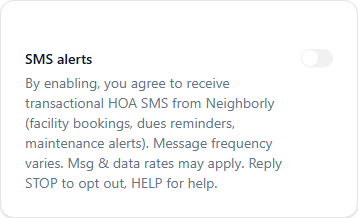
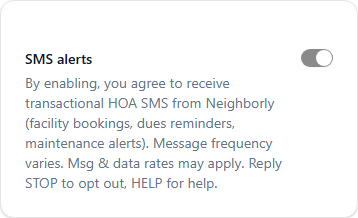
Below are screenshots of the SMS consent UI components as they appear in the application:
SMS Toggle - OFF State
SMS Toggle - ON State
To generate screenshots:
- Ensure the dev server is running:
npm run dev - Run the screenshot script:
npm run sms:shots - Screenshots will be saved to
public/sms-screenshots/
Or view the live preview at /sms/preview